
As modern workplaces continue to evolve, companies are paying more attention to the comfort and efficiency of their meeting spaces. This is why ergonomic smart meeting room design tips are becoming increasingly important for businesses preparing for the future of hybrid collaboration and digital communication in 2026.
A smart meeting room should not only look modern. It must also provide a comfortable environment that supports productivity, communication, brainstorming, and video conferencing throughout the workday.
Many companies focus heavily on advanced technology while overlooking ergonomics. In reality, uncomfortable meeting rooms can reduce concentration, create fatigue, and negatively impact productivity during long meetings.
An ergonomic smart meeting room helps businesses create collaboration spaces that are:
- more comfortable
- more efficient
- more interactive
- more flexible
- better suited for hybrid collaboration
For this reason, modern meeting room design must carefully consider visual comfort, audio quality, room layout, lighting, furniture, and technology integration.
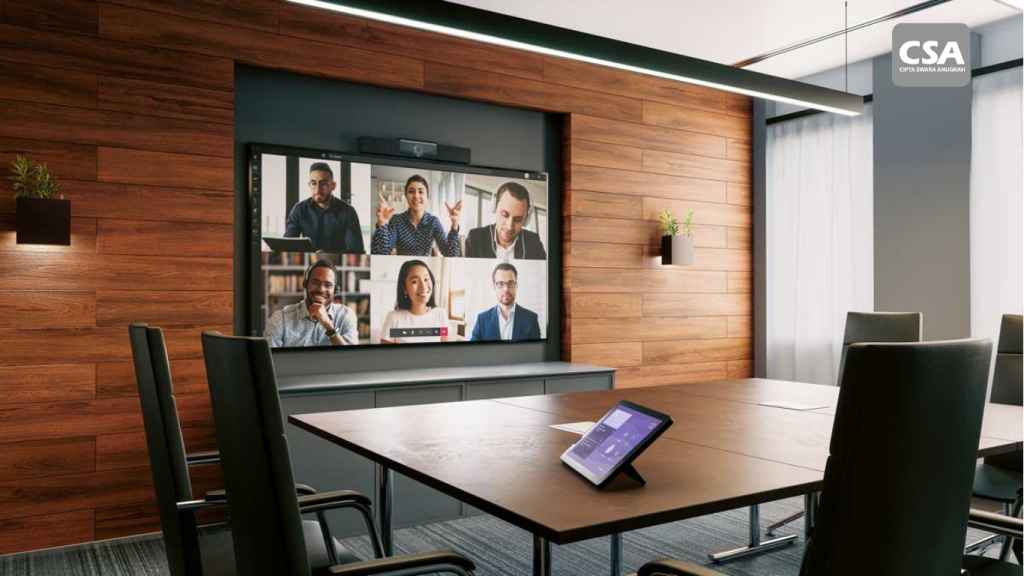
Start with the Right Room Layout
One of the most important ergonomic smart meeting room design tips is creating the right room layout from the beginning.
A poor layout can disrupt communication and make meetings uncomfortable.
Many meeting rooms suffer from:
- cramped seating arrangements
- poor screen visibility
- uncomfortable display positioning
- limited movement space
These issues can cause participants to feel tired more quickly during meetings.
A proper layout should:
- provide clear visibility to the display
- support natural communication
- optimize camera positioning
- allow comfortable movement throughout the room
A well-designed layout helps meetings feel more focused and productive.
Position the Interactive Display Properly
The interactive display serves as the visual center of a smart meeting room.
Because of this, display positioning is extremely important.
A screen that is mounted too high or too low can cause neck and eye strain during long meetings.
Important ergonomic recommendations include:
- placing the display at eye level
- choosing the correct screen size for the room
- avoiding extreme viewing angles
- ensuring every participant has comfortable visibility
Anti-glare display technology also helps reduce reflections and visual discomfort.
Match Room Size with Meeting Capacity
One of the most common mistakes in meeting room design is using a space that is too small for the number of participants.
This creates problems such as:
- uncomfortable seating arrangements
- poor air circulation
- limited communication space
- participant fatigue
An ergonomic smart meeting room should provide enough personal space for participants to remain comfortable during meetings.
At the same time, rooms that are too large may negatively affect audio quality and communication clarity.
The room size should always match the company’s collaboration needs.
Lighting Plays a Major Role in Comfort
Lighting is often treated as a decorative element rather than a productivity factor.
In reality, lighting directly affects participant comfort and concentration.
An ergonomic smart meeting room requires lighting that is:
- balanced
- comfortable for the eyes
- suitable for video conferencing
- evenly distributed throughout the room
Lighting that is too bright may create fatigue, while lighting that is too dim can make the room feel unprofessional.
Modern meeting rooms typically use:
- indirect lighting
- natural lighting
- anti-glare lighting
- evenly distributed illumination
This creates a more comfortable and professional meeting environment.
Use Clear and Natural Audio Systems
Audio quality is one of the most important elements in a smart meeting room.
Even the best visuals cannot compensate for poor audio performance.
An ergonomic design should prioritize:
- clear voice pickup
- balanced audio distribution
- echo reduction
- natural communication quality
Technologies such as ceiling microphones allow participants to speak naturally without handheld microphones.
Clear audio helps reduce fatigue and improves focus during hybrid meetings.
Camera Placement Should Feel Natural
Cameras play a critical role in hybrid collaboration.
Poor camera placement can make communication feel awkward for remote participants.
Effective ergonomic camera placement should:
- align with eye level
- provide stable positioning
- avoid overly high or low angles
- capture wide room coverage
PTZ cameras are especially effective because they support auto-tracking and automatic framing for more professional hybrid meetings.
Read Also: Benefits of a Meeting Room Interactive Display: Why Modern Businesses Need It in 2026
Choose Ergonomic Furniture
Meeting room furniture directly impacts participant comfort.
Ergonomic chairs help reduce physical fatigue during long meetings.
Important furniture considerations include:
- supportive seating
- proper table height
- sufficient legroom
- organized cable management
Comfortable furniture improves concentration and meeting productivity.
Reduce Cable Clutter
Meeting rooms filled with visible cables look disorganized and outdated.
Cable clutter can also interfere with room functionality and comfort.
Modern smart meeting rooms now use:
- wireless presentation systems
- hidden cable management
- integrated connectivity solutions
This creates cleaner, more professional meeting environments.
Implement Wireless Collaboration Technology
Wireless collaboration has become an essential part of ergonomic smart meeting room design.
Users can:
- share screens instantly
- switch presentations easily
- connect devices wirelessly
- start meetings faster
without relying on manual cable connections.
This makes meetings more practical and more efficient.
Improve Room Acoustics
Many meeting rooms look visually attractive but suffer from poor acoustics.
Rooms with excessive echo can make communication uncomfortable and unclear.
An ergonomic smart meeting room should focus on:
- sound-absorbing materials
- proper speaker placement
- echo control
- balanced audio distribution
Good acoustics improve both onsite and remote communication quality.
Use Automation Systems for Simplicity
Modern smart meeting rooms should be easy for anyone to operate.
Automation systems allow users to control:
- displays
- audio systems
- cameras
- lighting
- video conferencing platforms
through a single control interface.
This simplifies the meeting experience and reduces user confusion.
Integrate All Technologies into One Ecosystem
One of the biggest mistakes in meeting room design is using disconnected technologies.
This forces users to operate multiple systems separately.
An ergonomic smart meeting room should use integrated technology platforms so all devices work together seamlessly.
Solutions such as the Q-SYS Platform help integrate:
- cameras
- microphones
- speakers
- displays
- automation systems
into one efficient ecosystem.
Ergonomic Smart Meeting Rooms Improve Productivity
Comfortable meeting environments help participants stay focused and engaged.
Meetings become:
- faster
- more comfortable
- more efficient
- less disruptive
- more productive
This improves communication quality and decision-making processes within the company.
Ergonomic Design Will Become the Standard in 2026
In 2026, businesses will no longer focus only on visual aesthetics in meeting room design.
Companies will increasingly demand meeting spaces that are:
- comfortable
- efficient
- hybrid-ready
- easy to use
- technologically integrated
Because of this, ergonomic smart meeting room design is expected to become the new standard for modern workplaces.
Conclusion
Ergonomic smart meeting room design tips help companies create meeting environments that improve comfort, collaboration, and productivity.
From room layout and display positioning to lighting, audio systems, furniture, and integrated technology, every detail should support a better meeting experience.
In the era of hybrid work and digital collaboration, ergonomic smart meeting rooms are no longer just a workplace trend. They are becoming an essential part of modern business operations.
FAQ About Ergonomic Smart Meeting Room Design
1. What is an ergonomic smart meeting room?
An ergonomic smart meeting room is a modern meeting space designed for comfort, efficiency, and digital collaboration.
2. Why is ergonomics important in meeting rooms?
Because participant comfort directly affects focus and productivity during meetings.
3. What are the benefits of interactive displays in meeting rooms?
Interactive displays make meetings more engaging and easier to manage.
4. Why is lighting important in smart meeting rooms?
Lighting affects visual comfort and video conferencing quality.
5. What is the role of ceiling microphones in meeting rooms?
Ceiling microphones capture voices naturally and evenly throughout the room.
6. Why is wireless collaboration important?
It helps eliminate cable clutter and simplifies presentations.
7. What are the benefits of automation systems in meeting rooms?
Automation systems simplify the control of all meeting room technologies.
8. Why are ergonomic smart meeting rooms important in 2026?
Because companies increasingly need comfortable meeting spaces that support hybrid collaboration.