
Audio

As businesses continue to embrace digital transformation, meeting rooms are evolving into intelligent collaboration spaces equipped with interconnected technologies. What Is a Room Control System? How It Works and Its Benefits for Smart Meeting Rooms has become an increasingly common question among organizations looking to simplify meeting room operations while improving productivity.

Modern meeting rooms are no longer limited to a display and a conference table. Today, they typically include interactive displays, video conferencing systems, PTZ cameras, microphones, speakers, wireless presentation devices, lighting controls, and various other Audio Visual technologies. While these technologies enhance collaboration, managing each device separately can become inefficient and confusing.

This is where a Room Control System plays a vital role.

Instead of operating multiple remote controls or launching different applications, users can control the entire meeting room through a single interface. From turning on displays and adjusting audio volume to starting a video conference and selecting presentation sources, every function can be executed quickly with just one touch.

For organizations investing in Smart Meeting Rooms, understanding how a Room Control System works is essential. Beyond simplifying operations, this technology creates a more consistent, professional, and user-friendly meeting experience.

What Is a Room Control System?

A Room Control System is an integrated control platform that enables users to manage multiple meeting room technologies from a single centralized interface. Rather than controlling each device independently, the system communicates with all connected equipment simultaneously, allowing them to operate as one unified environment.

A Room Control System acts as the central command center of a Smart Meeting Room. It coordinates communication between displays, projectors, microphones, speakers, PTZ cameras, wireless presentation systems, lighting controls, motorized projection screens, and other integrated technologies.

The primary objective is not merely automation but operational simplicity.

With a properly configured Room Control System, users no longer need technical expertise to operate sophisticated Audio Visual equipment. Every meeting can begin quickly without requiring manual adjustments across multiple devices.

This streamlined experience reduces setup time while minimizing operational errors that often occur when different systems are managed separately.
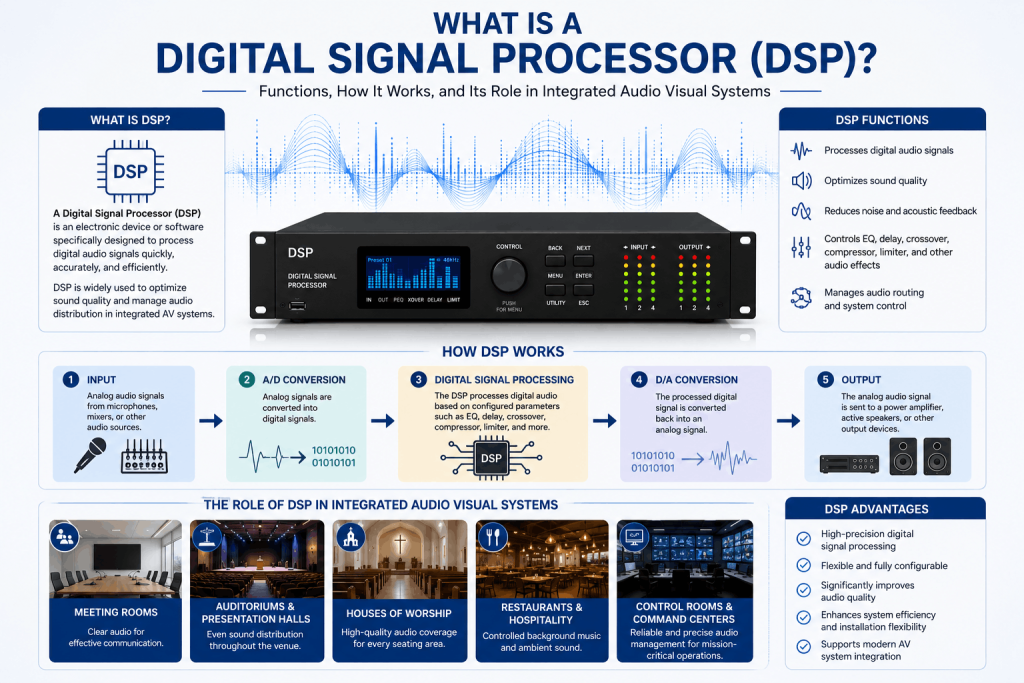
What Is a Digital Signal Processor

Read Also: What Is a Digital Signal Processor (DSP)? Functions, How It Works, and Its Role in Integrated Audio Visual Systems

Why Is a Room Control System Important in a Smart Meeting Room?

As meeting spaces become increasingly sophisticated, the number of connected devices also continues to grow.

Without centralized control, users may need to:

  • Turn on displays manually.
  • Select the correct HDMI input.
  • Adjust speaker volume.
  • Activate video conferencing equipment.
  • Position PTZ cameras.
  • Lower projection screens.
  • Configure lighting before every meeting.

Although each task appears simple individually, together they consume valuable time and create unnecessary complexity.

A Room Control System eliminates these repetitive processes by allowing every operation to be managed from one intuitive control interface.

With a single command such as “Start Meeting,” the system can automatically perform multiple actions simultaneously, including powering on displays, selecting presentation sources, adjusting room lighting, activating microphones, and preparing the video conferencing platform.

This level of automation enables employees to focus on collaboration instead of technology.

How Does a Room Control System Work?

Although a Room Control System manages numerous technologies, its operating principle is relatively straightforward.

The entire process can be understood through four primary stages.

1. User Initiates a Command

Every interaction begins when a user selects an option from the room’s control interface.

This interface may be accessed through:

  • Touch panels
  • Wall-mounted controllers
  • Tablet applications
  • Mobile applications
  • Desktop control software

Instead of operating multiple devices individually, users simply choose predefined functions such as:

  • Start Meeting
  • End Meeting
  • Presentation Mode
  • Video Conference Mode
  • Audio Only Mode

Each command automatically triggers a series of programmed actions.

2. The Control Processor Receives the Command

Once a command is selected, it is transmitted to the Control Processor, which serves as the brain of the Room Control System.

The processor interprets user instructions and determines which connected devices must respond.

Unlike conventional remote controls that communicate with only one device at a time, the Control Processor can coordinate multiple technologies simultaneously while maintaining synchronization between them.

This centralized processing significantly improves system efficiency and reliability.

3. Connected Devices Respond Automatically

After receiving instructions from the Control Processor, every integrated device performs its assigned function.

Depending on the meeting room configuration, the processor may simultaneously control:

  • Interactive Flat Panel displays
  • Professional displays
  • Projectors
  • PTZ cameras
  • Ceiling microphones
  • Wireless microphones
  • Digital Signal Processors (DSP)
  • Audio systems
  • Wireless presentation devices
  • Motorized projection screens
  • Lighting control systems

Because every component operates according to predefined programming, users experience a seamless meeting startup process without manual intervention.

4. The Meeting Environment Is Ready

Within seconds, the meeting room transitions into its desired operating mode.

Displays are active.

Microphones are enabled.

Speakers are configured.

Presentation sources are selected.

Video conferencing systems are ready for participants to join.

Instead of spending several minutes preparing equipment, meetings can begin almost immediately.

This streamlined workflow is one of the primary reasons organizations increasingly adopt Room Control Systems as part of their Smart Meeting Room strategy.

Core Components of a Room Control System

Although Room Control Systems vary depending on project requirements, most professional implementations consist of several essential components working together.

Touch Panel or User Interface

The touch panel serves as the primary interface between users and the meeting room technology.

Rather than presenting complex technical settings, the interface provides simple, intuitive controls that allow users to manage the room with minimal training.

Customized interfaces may include buttons for:

  • Start Meeting
  • End Meeting
  • Presentation Mode
  • Camera Control
  • Audio Volume
  • Source Selection

An intuitive interface significantly improves the overall user experience while reducing operational mistakes.

Control Processor

The Control Processor is the most important component within the entire system.

It receives user commands, executes automation logic, communicates with connected devices, and coordinates every operational sequence.

Without the processor, individual devices would function independently rather than as an integrated Smart Meeting Room.

Communication Network

A reliable communication network enables the Control Processor to exchange information with every connected device.

Depending on the system architecture, communication may occur through Ethernet, serial communication, infrared (IR), relay control, or other supported protocols.

Stable network infrastructure ensures fast response times and dependable system performance.

Integrated Audio Visual Devices

A Room Control System reaches its full potential when connected to multiple Audio Visual technologies.

Common integrated devices include:

  • Interactive Flat Panels
  • Professional displays
  • PTZ cameras
  • Ceiling microphones
  • Audio processors
  • Professional speakers
  • Wireless presentation systems
  • Video conferencing equipment

Rather than functioning independently, these technologies operate together as a single coordinated solution.

Key Functions of a Room Control System

The primary purpose of a Room Control System extends beyond simply turning devices on and off.

It is designed to simplify room management while creating a consistent and efficient user experience.

Some of its most valuable functions include:

One-Touch Meeting Automation

Users can prepare the entire meeting room by pressing a single button.

Multiple devices automatically activate according to predefined workflows, eliminating lengthy setup procedures.

Source Selection

Users can instantly switch between different presentation sources without manually changing display inputs.

This feature supports smooth collaboration between presenters.

Audio Control

Room Control Systems allow centralized management of speaker volume, microphone settings, and other integrated audio functions through a single interface.

This eliminates the need to access multiple control panels during meetings.

Camera Control

Integrated PTZ cameras can be positioned directly from the room’s control interface.

Users can adjust camera angles, zoom levels, and predefined presets without requiring separate control applications.
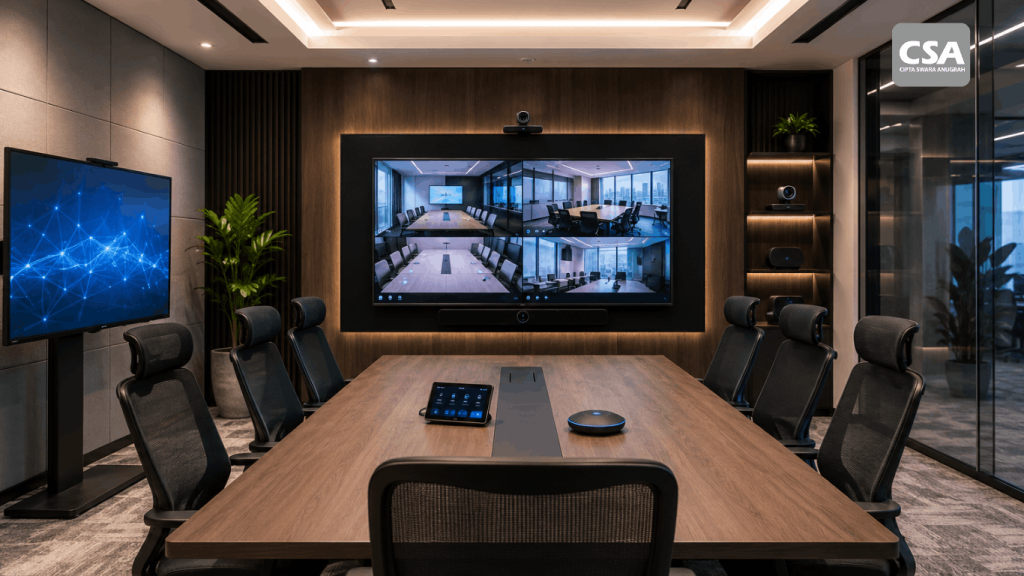
Modern Smart Meeting Room Standards for Companies in 2026

Read Also: Modern Smart Meeting Room Standards for Companies in 2026: 8 Essential Technologies You Need

Benefits of a Room Control System for Smart Meeting Rooms

Implementing a Room Control System offers far more than convenience. It helps organizations improve operational efficiency, simplify technology management, and create a better meeting experience for every participant.

Below are some of the key benefits businesses can expect.

Faster Meeting Preparation

One of the biggest advantages of a Room Control System is its ability to reduce meeting preparation time.

Instead of manually turning on displays, selecting presentation sources, adjusting audio settings, and preparing video conferencing equipment, users can complete the entire process with a single command.

This allows meetings to begin immediately without unnecessary technical delays.

Improved User Experience

Not every employee has technical expertise in operating Audio Visual equipment.

A Room Control System simplifies room operation by presenting users with an intuitive interface that requires minimal training. Whether hosting an internal meeting or welcoming external clients, employees can confidently operate the meeting room without assistance from the IT department.

A better user experience also encourages greater adoption of Smart Meeting Room technology throughout the organization.

Reduced Human Error

Operating multiple devices individually increases the likelihood of mistakes.

Users may select the wrong input source, forget to activate microphones, or incorrectly configure video conferencing equipment.

With predefined automation workflows, a Room Control System performs these tasks consistently every time, significantly reducing operational errors and ensuring a reliable meeting experience.

Increased Productivity

Time spent troubleshooting technology is time taken away from productive discussions.

By automating routine operations, a Room Control System enables teams to focus on collaboration, decision-making, and problem-solving instead of managing equipment.

Even small time savings across multiple meetings each day can result in substantial productivity improvements over the long term.

Simplified Device Management

As organizations expand their meeting spaces, managing numerous Audio Visual devices can become increasingly complex.

A centralized control platform simplifies this process by allowing all connected technologies to operate through a unified interface.

This consistency makes meeting rooms easier to manage, regardless of their size or configuration.

Scalable for Future Expansion

Business requirements evolve over time.

A professionally designed Room Control System can be expanded to support additional displays, cameras, microphones, or other Audio Visual technologies without requiring a complete system redesign.

This scalability helps organizations protect their technology investments while supporting future growth.

Where Are Room Control Systems Commonly Used?

Although Room Control Systems are closely associated with Smart Meeting Rooms, their applications extend across many professional environments.

Corporate Meeting Rooms

Meeting rooms remain the most common implementation.

Organizations use Room Control Systems to simplify daily collaboration while integrating displays, microphones, speakers, cameras, and conferencing platforms into a single operational workflow.

Executive Boardrooms

Executive meetings require dependable technology with minimal operational complexity.

A Room Control System ensures every meeting begins efficiently while providing executives with simple controls for presentations, discussions, and video conferences.

Training Rooms

Training environments often involve different presenters throughout the day.

Room Control Systems allow instructors to prepare the room quickly while maintaining a consistent user experience for every training session.

Auditoriums and Conference Halls

Large presentation spaces typically incorporate numerous Audio Visual technologies.

A centralized control system enables operators to manage displays, projectors, sound systems, lighting, and presentation equipment from one interface, improving operational efficiency during events.

Command Centers and Control Rooms

Mission-critical facilities require reliable and coordinated technology management.

Room Control Systems provide centralized control over multiple Audio Visual systems, allowing operators to focus on monitoring and decision-making rather than managing individual devices.

Why Professional Implementation Matters

Installing a Room Control System involves much more than connecting hardware.

Every meeting room has unique operational requirements, room layouts, communication workflows, and technology ecosystems. As a result, successful implementation requires careful planning, system programming, and thorough testing.

Professional AV System Integrators typically perform several essential activities, including:

  • Conducting site surveys.
  • Understanding operational requirements.
  • Designing integrated control workflows.
  • Programming automation sequences.
  • Configuring communication between devices.
  • Testing system performance.
  • Training end users.
  • Providing ongoing technical support.

Without proper implementation, even advanced Room Control Systems may fail to deliver the seamless experience organizations expect.

How CSA Indonesia Implements Room Control Systems

As an experienced AV System Integrator, CSA Indonesia develops Room Control System solutions that simplify meeting room operations while supporting long-term business needs.

Each project begins with a detailed consultation to understand the client’s operational objectives, room configuration, and collaboration requirements. Based on this assessment, CSA Indonesia designs a customized control solution that integrates all relevant Audio Visual technologies into one intuitive platform.

The implementation process includes system design, hardware integration, control programming, interface customization, commissioning, and comprehensive testing. Every function is carefully configured to ensure reliable communication between displays, PTZ cameras, microphones, Digital Signal Processors (DSP), wireless presentation systems, and other connected devices.

Beyond installation, CSA Indonesia also provides user training and technical support, enabling organizations to maximize the value of their Smart Meeting Room investment while maintaining a simple and consistent user experience.

Conclusion

A Room Control System has become an essential component of modern Smart Meeting Rooms. Rather than requiring users to operate multiple technologies independently, it brings every connected Audio Visual device together under a single, intuitive control interface.

By automating routine tasks such as powering displays, selecting presentation sources, controlling cameras, adjusting audio settings, and preparing video conferencing systems, organizations can reduce meeting setup time, improve productivity, and create a more professional collaboration environment.

However, the effectiveness of a Room Control System depends not only on the technology itself but also on proper system design, programming, and integration.

Working with an experienced AV System Integrator such as CSA Indonesia ensures that every meeting room is designed around operational needs, providing a reliable, scalable, and easy-to-use solution that supports efficient collaboration today and future business growth tomorrow.

Frequently Asked Questions (FAQ)

1. What is the primary purpose of a Room Control System?

A Room Control System provides centralized control over multiple meeting room technologies, allowing users to operate displays, cameras, microphones, audio systems, lighting, and other integrated devices through a single interface.

2. Is a Room Control System only used in Smart Meeting Rooms?

No. While commonly used in Smart Meeting Rooms, Room Control Systems are also implemented in executive boardrooms, auditoriums, training rooms, command centers, conference halls, and other professional environments.

3. Can a Room Control System control devices from different manufacturers?

Yes. Professional Room Control Systems are designed to integrate with compatible technologies from multiple manufacturers, creating a unified operational experience.

4. Does implementing a Room Control System require replacing existing Audio Visual equipment?

Not necessarily. In many cases, existing compatible Audio Visual devices can be integrated into a new Room Control System, depending on the system architecture and communication protocols.

5. What is the difference between a Room Control System and a standard remote control?

A standard remote typically controls one device at a time, while a Room Control System manages multiple integrated technologies simultaneously through automation and centralized programming.

6. Why should businesses work with an AV System Integrator when implementing a Room Control System?

An AV System Integrator designs, programs, configures, and tests the complete solution to ensure all technologies work together efficiently, providing a reliable and user-friendly Smart Meeting Room experience