
An auditorium is more than a large room with a stage and rows of seats. It is a professional space designed to accommodate presentations, conferences, seminars, performances, and other large-scale events. To support these activities effectively, the venue needs technology that delivers clear sound, visible content, reliable video distribution, and convenient operation.
Auditorium audio visual systems bring together audio, visual, video, and control technologies into one coordinated environment. Instead of operating individual devices separately, an integrated system allows each component to support the overall function of the venue.
However, selecting speakers, microphones, LED displays, or projectors is only part of the process. The real challenge lies in designing the system around the auditorium’s dimensions, acoustic characteristics, audience capacity, and operational requirements.
A properly planned AV environment helps reduce technical complexity, improve event quality, and provide greater flexibility for different types of activities. This article explores the key components, technical considerations, and integration processes involved in designing a professional auditorium AV solution.
Why Does an Auditorium Need an Integrated AV System?
Auditoriums often serve multiple purposes. A corporate venue may host a business presentation in the morning, a panel discussion in the afternoon, and a product launch in the evening. Educational institutions may use the same space for lectures, graduation ceremonies, and public seminars.
Each activity requires a different combination of audio, visual, and control functions. Without proper integration, operators may need to configure several devices individually before every event.
An integrated approach connects the main AV components through a coordinated system. This makes it easier to manage audio sources, display content, video feeds, and operating scenarios.
Some important benefits include:
- Consistent audio coverage: Proper speaker placement and signal processing help deliver clear sound across different seating areas.
- Better visual presentation: Display technologies can be selected according to screen size, viewing distance, and ambient lighting.
- Simplified operation: A centralized control interface allows operators to manage multiple devices from one location.
- Faster event preparation: Preset configurations can simplify transitions between presentations, conferences, and performances.
- Future system expansion: Proper infrastructure planning makes it easier to add devices and upgrade capabilities later.
This approach follows the principles discussed in Why Should Audio Visual Systems Be Designed as One Integrated System?. Integration is not simply about connecting equipment. It is about making every component work together to achieve the venue’s objectives.
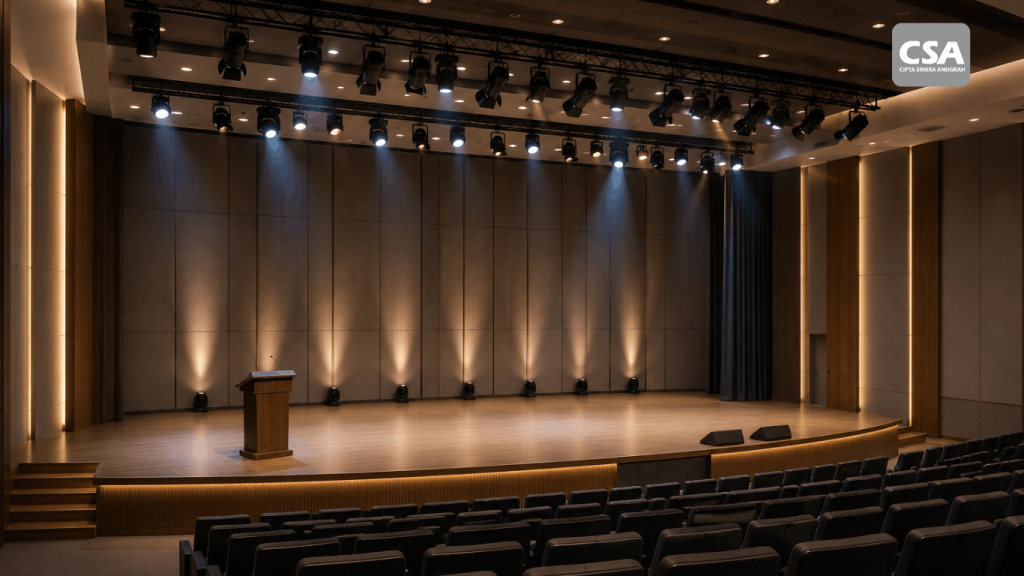
Read Also: Lighting Systems for Auditoriums: Integrated Solutions for Professional Venues
Essential Components of an Auditorium AV System
The equipment required for an auditorium depends on its size, function, and event requirements. However, several core components commonly form the foundation of a professional AV installation.
1. Professional Audio and Speaker Systems
Audio quality is one of the most important factors in an auditorium. Every audience member should be able to hear speakers, performers, and supporting audio clearly, regardless of their seating position.
Speaker selection must consider room dimensions, audience capacity, ceiling height, room shape, and the type of events hosted in the venue. A long rectangular auditorium may require a different speaker arrangement from a fan-shaped space.
Common speaker configurations include:
- Main speakers: Deliver the primary sound reinforcement to the audience.
- Delay speakers: Provide additional coverage for deeper seating areas.
- Subwoofers: Reproduce low-frequency content for music and live performances.
- Stage monitors: Allow presenters and performers to hear relevant audio on stage.
Speaker placement must account for coverage patterns and listening positions. Poor positioning can create uneven sound levels, leaving some audience areas too loud while others receive insufficient coverage.
The design should also consider room acoustics and speech intelligibility. For venues that primarily host seminars and conferences, clear speech reproduction is often more important than maximum sound pressure.
For further insight, read Why Sound System Design Matters More Than Choosing Expensive Speakers.
2. Microphones for Presenters and Performers
Microphones capture audio from presenters, moderators, panelists, and performers. The right microphone type depends on the event format and the user’s mobility requirements.
Common options include:
- Wireless handheld microphones: Suitable for mobile presenters and audience question-and-answer sessions.
- Wireless lavalier microphones: Allow presenters to speak without holding a microphone.
- Gooseneck microphones: Commonly installed on podiums and conference tables.
- Boundary microphones: Useful for selected discussion and table-based applications.
The number of microphone channels should be determined during the design stage. An auditorium that frequently hosts panel discussions may require more input channels than a venue designed for single-speaker presentations.
Wireless frequency coordination, battery management, and channel allocation should also be considered. These measures help reduce interference and maintain reliable microphone performance during events.
3. LED Displays and Projectors
Visual presentation technology helps audiences follow presentations, videos, and other content. Choosing the right display solution requires consideration of auditorium size, viewing distance, ambient lighting, and content requirements.
Two commonly considered technologies are LED displays and projectors.
LED displays provide high brightness and flexible screen configurations. They are suitable for presentations, video playback, and visual content that requires strong visibility under different lighting conditions.
Projectors can be an effective option for venues that require large image sizes while considering installation requirements and budget. Important specifications include brightness, resolution, throw ratio, projection distance, and screen characteristics.
Screen positioning is equally important. The display should remain visible from different seating sections, including the rear and side areas. Installation height must also be considered to minimize visual obstruction.
The final decision should be based on the venue’s actual requirements rather than selecting a technology simply because it has a higher specification.
4. Video Cameras and Production Equipment
Modern auditoriums are not limited to in-person activities. Many venues also record events or broadcast them to remote audiences.
A suitable video system may include cameras, video switchers, capture devices, and supporting production equipment.
Multiple cameras can capture different perspectives, such as the main stage, individual speakers, and the overall auditorium. A video switcher allows operators to select and transition between these sources during an event.
For hybrid events, the system must also support video conferencing integration. Microphone audio needs to reach remote participants, while incoming audio from online attendees should be routed to the auditorium’s sound system.
These requirements are closely related to MICE Audio Visual System: Essential Technology for Large-Scale Conferences with CSA Indonesia, particularly for events involving multiple audio and video sources.
5. Digital Signal Processor (DSP)
A Digital Signal Processor, commonly known as a DSP, is an important component in professional auditorium audio systems. It processes audio signals before they reach amplifiers and loudspeakers.
Depending on the system configuration, DSP processing can include equalization, crossover management, delay alignment, signal routing, and other audio processing functions.
For example, delay settings help synchronize sound from the main speakers and additional speakers. Equalization allows technicians to adjust frequency response according to the room’s acoustic characteristics.
A DSP can also manage multiple audio inputs and outputs. With the right configuration, operators can route audio sources to different zones based on the event requirements.
Learn more about its functions in What Is a Digital Signal Processor (DSP)? Functions, How It Works, and Its Role in Integrated Audio Visual Systems.
6. Video Switching and Signal Distribution
Auditoriums with multiple content sources need a reliable video management system. Sources may include presenter laptops, operator computers, cameras, media players, and video conferencing equipment.
A video switcher allows operators to select which source appears on the main display. Signal distribution equipment then routes the selected content to the required screens.
The design must account for resolution, video formats, cable distances, device compatibility, and connectivity requirements. Appropriate distribution infrastructure helps reduce signal interruptions and display compatibility issues.
Signal flow should also be documented during the design stage. This gives technicians a clear reference when testing connections or troubleshooting technical problems.
7. Control Systems and Automation
A control system simplifies the operation of multiple auditorium devices. Without centralized control, operators may need to access individual equipment interfaces to prepare the room for an event.
An integrated control interface can manage functions such as:
- Powering devices on and off.
- Selecting display input sources.
- Adjusting audio levels.
- Controlling projectors and screens.
- Activating event-specific presets.
- Managing connected lighting systems.
For example, an operator can select a seminar preset to activate the required microphone channels, display a presentation source, and adjust the lighting configuration. A different preset can be used when the venue hosts a performance.
This concept is related to What Is a Room Control System? How It Works and Its Benefits for Smart Meeting Rooms. Although auditorium installations have different scales and requirements, centralized control remains an important part of an efficient AV environment.

Read Also: Auditorium Sound System with CSA Indonesia: Professional Audio Solutions for Large Venues
Technical Factors to Consider Before Designing an Auditorium AV System
Selecting equipment is only one part of the planning process. Before choosing specifications, an AV integrator needs to understand the physical characteristics of the venue and the expectations of its users.
1. Room Capacity and Layout
Audience capacity influences speaker coverage, display size, microphone requirements, and equipment positioning. An auditorium designed for 100 people will have different requirements from a venue that accommodates 500 people.
Room geometry also affects system design. Fan-shaped, rectangular, and tiered auditoriums have different sound distribution patterns and viewing angles.
Therefore, planning should not rely on floor area alone. Stage position, ceiling height, seating angles, and audience distance must also be evaluated.
2. Room Acoustics and Sound Coverage
Audio performance is influenced by more than speaker specifications. Wall materials, flooring, ceiling surfaces, and room geometry affect how sound travels and reflects.
Excessive reflections can create reverberation and reduce speech clarity. On the other hand, an unsuitable balance of sound absorption may also affect the overall audio experience.
The design should consider speech intelligibility and sound coverage across the audience area. For auditoriums frequently used for seminars and conferences, clear speech reproduction should be a primary objective.
3. Viewing Distance and Lighting Conditions
Display size must match the distance between the screen and the audience. Presentation content should remain readable from the rear seating areas.
Ambient lighting also needs attention. Excessive light can reduce projected image visibility, while poorly controlled lighting may affect the overall viewing experience.
For multipurpose auditoriums, adjustable lighting can provide greater flexibility. Different lighting scenes can be configured for presentations, conferences, and performances.
This requirement can be supported by Lighting Systems for Auditoriums: Integrated Solutions for Professional Venues.
4. Equipment Compatibility and Infrastructure
Every device needs an appropriate connection path. Planning should account for connector types, communication protocols, signal formats, network requirements, and infrastructure capacity.
Cable routes, equipment racks, electrical distribution, and connection points should also be considered. Inadequate infrastructure can complicate installation and increase the risk of operational issues.
Signal flow diagrams and equipment documentation are essential parts of the design. They provide technicians with a clear reference for maintenance, troubleshooting, and future system upgrades.
5. Operational Simplicity and Future Expansion
An advanced system is not necessarily effective if operators find it difficult to use. Users should be able to access essential functions without needing to understand every technical configuration.
The control interface should therefore be designed around actual operational needs. The system should also allow for future additions, such as more cameras, displays, microphones, or conferencing equipment.
Planning for expansion from the beginning can reduce the need for major infrastructure changes later.
Auditorium AV Configurations for Different Events
Different activities require different operating scenarios. Understanding these requirements helps determine the most suitable system configuration.
Auditorium for Seminars and Presentations
Seminars prioritize presenter speech clarity and presentation visibility. A typical configuration may include wireless microphones, main speakers, an LED display or projector, and a centralized control system.
Operators can select the presenter’s laptop as the visual source and adjust microphone levels through the control interface.
Auditorium for Conferences and Hybrid Events
Conferences often involve more audio and video sources. In addition to presentation equipment, the system may include multiple cameras, video switching, DSP processing, and video conferencing integration.
Presenter audio must reach both the in-person audience and remote participants. Camera placement should also provide suitable views of the stage and speakers.
Auditorium for Live Performances
Music and entertainment events require a more extensive audio configuration. The system may include main speakers, subwoofers, stage monitors, audio mixers, microphones, and lighting equipment.
The configuration should reflect the number of performers, instrument requirements, and event format. These needs differ significantly from those of a presentation-focused auditorium.
Auditorium for Educational Institutions
Educational institutions may use auditoriums for public lectures, academic seminars, graduation ceremonies, and internal events.
The system should support presentations, video playback, microphone operation, and event recording. Flexibility is particularly important because different departments may use the same venue for different activities.
Why Should Auditorium AV Integration Be Handled by a Professional Integrator?
Combining equipment from different categories does not automatically create an effective system. Every component must have compatible specifications, suitable configurations, and reliable signal connections.
An AV system integrator helps translate the client’s requirements into a complete technical design. The process includes system planning, equipment selection, connection architecture, installation, testing, and operational support.
A typical integration process includes the following stages:
- Requirements analysis: Identify the auditorium’s functions, audience capacity, event types, and operational needs.
- Site survey: Evaluate room dimensions, acoustics, lighting, infrastructure, and existing installation conditions.
- System design: Determine equipment specifications, installation positions, signal flow, power requirements, and control functions.
- Installation and integration: Install the equipment and connect each component according to the approved design.
- Testing and commissioning: Verify audio performance, visual output, connectivity, and operating scenarios.
- Training and maintenance: Help operators understand the system and establish a maintenance process.
To understand this professional role in more detail, read What Is an AV System Integrator? Understanding the Role and AV System Integration Process.
System design should also be completed before installation begins. Why Is Audio Visual Design an Essential Step Before Installation? explains how proper planning affects the final installation results.
Installation, Testing, and Auditorium AV Maintenance
Once the design has been approved, the project moves into equipment installation. Every component should be positioned according to the technical plan. Rack arrangements, cable routes, electrical connections, and signal pathways must allow safe operation and convenient technical access.
The next stage is system testing. Simply confirming that each device powers on is not enough. The complete installation must be evaluated under realistic operating conditions.
Important testing procedures include:
- Checking sound coverage across audience seating areas.
- Evaluating speech clarity and potential microphone feedback.
- Verifying display quality on main and secondary screens.
- Testing video source switching between laptops, cameras, and media players.
- Checking audio and video synchronization.
- Testing control system functions and event presets.
- Verifying video conferencing connectivity when required.
After commissioning, regular maintenance helps preserve system performance. Technicians should inspect connectors, cables, audio equipment, displays, control devices, and system configurations.
Maintenance records and configuration documentation also make troubleshooting more efficient. For additional information, read Why Is Audio Visual Maintenance Important for Companies? Here Are the Benefits You Need to Know.
Build a Professional Auditorium AV Environment with CSA Indonesia
Designing a modern auditorium requires a clear understanding of event requirements, room characteristics, and the relationship between audio, visual, video, and control technologies. Each component must be selected according to its function and integrated into a coordinated system.
CSA Indonesia provides professional audio visual integration solutions for businesses and institutions. The approach focuses on planning and implementing systems according to each project’s technical and operational requirements.
From sound reinforcement and microphones to displays, video switching, DSP processing, and control systems, every component needs to be considered as part of the overall installation.
If your organization, educational institution, or company is planning a new auditorium or upgrading an existing venue, consult CSA Indonesia about your project requirements. Proper planning and professional integration can help create a flexible, reliable environment for presentations, conferences, and professional events.
Conclusion
A successful auditorium depends on more than room capacity or individual equipment specifications. The integration of audio, visual, video, and control technologies plays an important role in creating a professional event environment.
The planning process should consider room acoustics, speaker coverage, viewing distance, display selection, signal distribution, and operational simplicity. Installation must also be followed by proper testing and regular maintenance.
With support from a professional integrator such as CSA Indonesia, each component can operate as part of one coordinated system. The result is an auditorium that is easier to manage, more adaptable to different event formats, and better prepared for future requirements.
Frequently Asked Questions About Auditorium AV Systems
1. What is an auditorium audio visual system?
An auditorium audio visual system is a combination of audio, visual, video, and control equipment designed to support seminars, conferences, presentations, performances, and other large-scale events.
2. What equipment is needed for an auditorium AV installation?
Common equipment includes speakers, amplifiers, microphones, audio processors or DSPs, LED displays or projectors, cameras, video switchers, signal distribution devices, and control systems. The final configuration depends on the venue’s size and operational requirements.
3. What is the difference between an LED display and a projector for an auditorium?
LED displays offer high brightness and flexible screen configurations. Projectors can be suitable for large image requirements with different installation and budget considerations. The choice depends on viewing distance, ambient lighting, resolution, and content requirements.
4. Why is acoustic design important in an auditorium?
Acoustic design helps control sound reflections and improve speech intelligibility. Without proper planning, sound may become excessively reverberant or uneven across audience areas.
5. Can an auditorium support hybrid events?
Yes. An auditorium can be equipped with cameras, video switchers, DSPs, video conferencing devices, and audio distribution systems to support both in-person and remote participants.
6. Why should a professional AV system integrator be involved?
A professional AV system integrator helps analyze requirements, design equipment configurations, connect system components, conduct testing, and support maintenance. This ensures that the equipment operates as one coordinated solution.